

- Waiting for content to load after clicking “Load More” or “View More Comments.”
- Waiting for a new page to render after switching pages or submitting forms.
- Pages with heavy JavaScript or significant network latency.
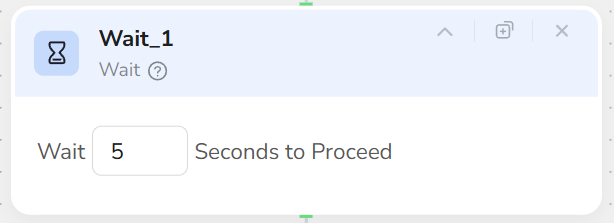
- Pauses the workflow for a specified number of seconds (e.g., 3s, 5s, 10s).
- Can be used as a pacing tool between any nodes.
- Add a Wait node.
- Enter the number of seconds in Wait Time, for example:
- 3 seconds: Fast-loading pages.
- 5 seconds: General dynamic pages.
- 10 seconds: Complex or slow pages.
- At runtime, the workflow pauses at this node for the corresponding duration, then proceeds to the next node.
- Recommended for use after nodes that trigger page changes, such as Click Element, Visit Page, Pagination, or Scroll.
- Wait times should be “sufficient but not excessive”; optimize through testing.
- For pages that load in stages, use multiple shorter Wait nodes after key actions instead of one long wait.
- Note: Wait cannot replace element detection logic; it is merely a time compensation measure.