


- Repeating “Pagination + Extraction” operations across multiple pages until a target data count is reached.
- Looping “Scroll + Extraction” on infinite scroll pages until “No more data” appears.
- Repeatedly clicking a “Load More” button until specific text appears or a condition is met.
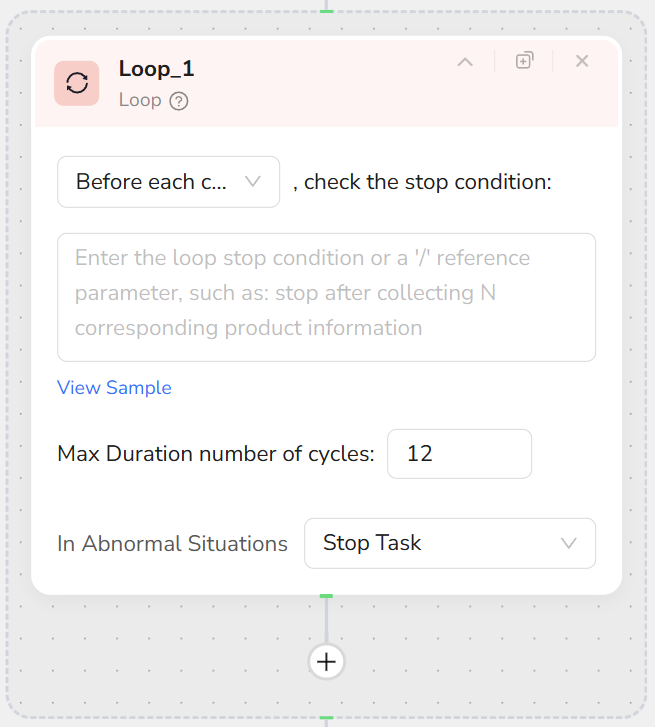
- Supports natural language descriptions for exit conditions (e.g., “Until 50 items are collected”).
- Supports setting a maximum iteration count (default 10, max 999) to prevent infinite loops.
- Supports selecting condition check timing (Before Loop / After Loop).
- Supports choosing “Stop Task” or “Skip Current Loop” on errors.
- Add a Loop node.
- Configure the exit condition description, for example:
- “Until the collected product count reaches item_limit”
- “Stop when the text ‘No more results’ appears at the bottom of the page”
- Set Max Iterations (e.g., 10, 20) as a safety cap.
- Select check timing:
- Before Loop: Check condition before execution; if met, the loop body is not executed.
- After Loop: Execute the loop at least once, then check if it should continue.
- Add child nodes inside the Loop (such as Scroll, Extract Data, Pagination, etc.) to form the loop body.
- Prioritize clear, determinable exit conditions. Avoid vague descriptions like “Until all data is scraped.”
- During development and debugging, set specific Max Iterations low (e.g., 2) to test workflow correctness before scaling up.
- Loop is oriented towards controlling “action-level repetition,” whereas item-by-item processing is better handled by Loop List.
Related Video