


- Checking if a user is logged in (e.g., does a “Sign out” button exist on the page?).
- Checking if there is a next page (e.g., is the “Next Page” button clickable?).
- Checking stock status (does the page display “Out of Stock” or “Sold Out”?).
- Handling pop-ups or ad overlays (checking if specific pop-up elements appear).
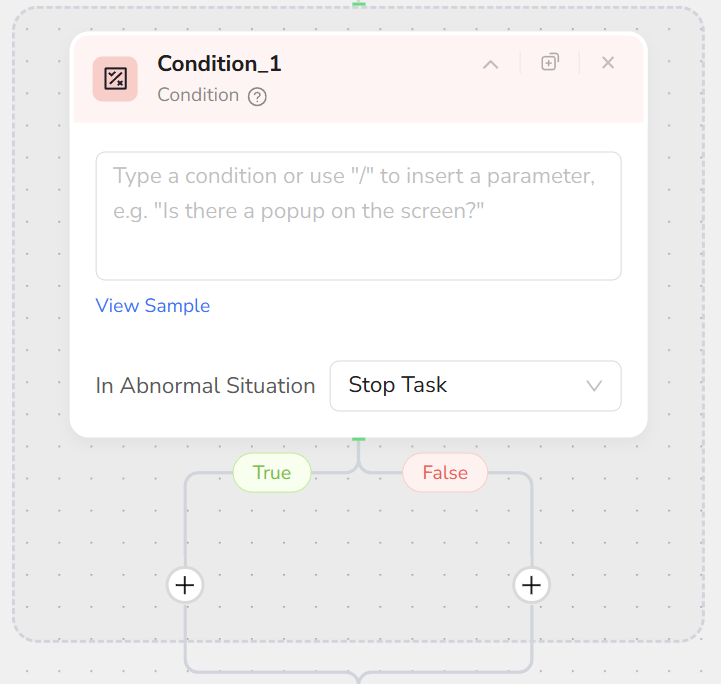
- Uses natural language to describe conditions.
- Provides default True / False branches, which can connect to any nodes.
- Supports multi-dimensional judgment based on visible page content, URL, variables, preceding node outputs, etc.
- Add a Condition node.
- Use natural language in the condition description, for example:
- “Does the current page display the text ‘Out of Stock’?”
- “Does a ‘View All Jobs’ button exist?”
- “Does the current URL contain ‘/checkout’?”
- Configure the True branch: The chain of nodes to execute when the condition is met.
- Configure the False branch: The chain of nodes to execute when the condition is not met.
- At runtime, the system automatically evaluates the condition and follows the corresponding branch.
- Be as specific as possible when describing conditions. Avoid vague phrases like “Check the button.”
- Condition nodes support nesting up to 3 levels; be mindful of branch complexity and maintainability.
- If two branches eventually perform the same behavior, both True and False branches can point to the same subsequent node.
- For very complex logic, split into multiple serial Condition nodes to implement multi-step judgment.