


- Completing login flows that require username, password, and verification codes (e.g., email/SMS OTP).
- Handling captcha-protected pages that must be solved by a human.
- Manually reviewing content or making a decision before continuing (e.g., approve/reject, choose a category).
- Performing sensitive or high-risk operations that should not be fully automated.
- Pauses the workflow and temporarily transfers browser control to a human operator.
- Supports multiple notification options: in-app notification and optional email notification.
- Allows execution either inside the BrowserAct interface or via a standalone web interface opened from email.
- Automatically resumes the workflow once the human step is completed and confirmed.
- Supports a configurable time limit for how long the workflow waits for human intervention.
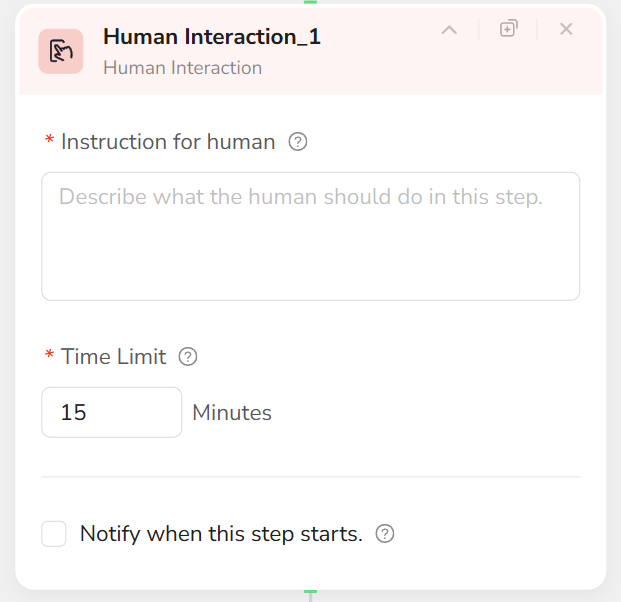
- Add a Human Interaction node to the workflow.
- In Instruction for human, clearly describe what the human should do on the page. For example:
- “Please enter your username, password, and verification code to complete the login process.”
- “Please solve the captcha and ensure the page successfully loads the dashboard.”
- Set Time Limit to define how long the workflow should wait for human intervention. When the time limit expires, this step ends immediately according to your workflow design.
- Configure Notify when this step starts:
- Checked: Enter a valid email address. An email notification will be sent, and the recipient can open a standalone web interface to perform the task—useful when the operator is away from the main console.
- Unchecked: The human performs all actions directly inside the BrowserAct interface without email notification.
- When execution reaches the Human Interaction node, the operator follows the instructions, completes the required actions in the browser, and clicks Resume to continue the workflow.
- Keep instructions short, specific, and action-oriented so the human knows exactly what to do.
- Choose a reasonable time limit based on how long the manual step typically takes.
- Use email notifications when the operator may not be in front of the BrowserAct interface.
- Place Human Interaction nodes only at steps that truly require manual actions to avoid unnecessary interruptions.