

 Watch How to Scrape Deep Nested Data with Loop List on YouTube.
- Batch extracting data from Reddit posts, product cards, job cards, etc.
- Entering the detail page of each item in a list to collect more detailed information.
- Performing the same operation (click, scroll, scrape) on every element in a list.
- Locates list regions via natural language description.
- Supports setting a maximum number of loop items (Max Focused Loop Items).
- Supports a Load More option for lists requiring expansion.
- Supports up to 3 levels of nested Loop Lists for complex multi-level lists.
- Add a Loop List node.
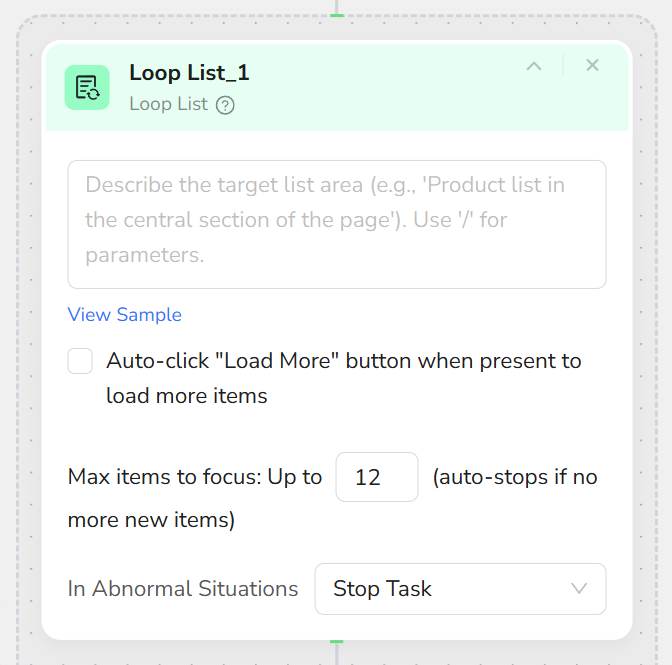
- Configure basic settings:
- List Region Description: Describe where the list is located, e.g., “The job list area in the middle of the page.”
- Load More:
- Check: If the list requires clicking “Load More” or uses pagination.
- Uncheck: If the list auto-loads or only the current page is needed.
- Max Focused Loop Items: Maximum number of items to process (e.g., 10, 20, 50), set according to business needs.
- Add child nodes inside the Loop List:
- Extract Data Item: Extract fields from the current list item.
- Click Element Item: Click a button or link within the current list item.
- Only one Loop List node is allowed per hierarchy level; maximum 3 levels of nesting.
- Loop List requires at least one child node (Extract Data Item or Click Element Item).
- Setting Max Focused Loop Items too high may result in excessive execution time; match it to actual requirements.
- For infinite scroll lists, combine with Scroll nodes and the “Load More” option.
Related Video