

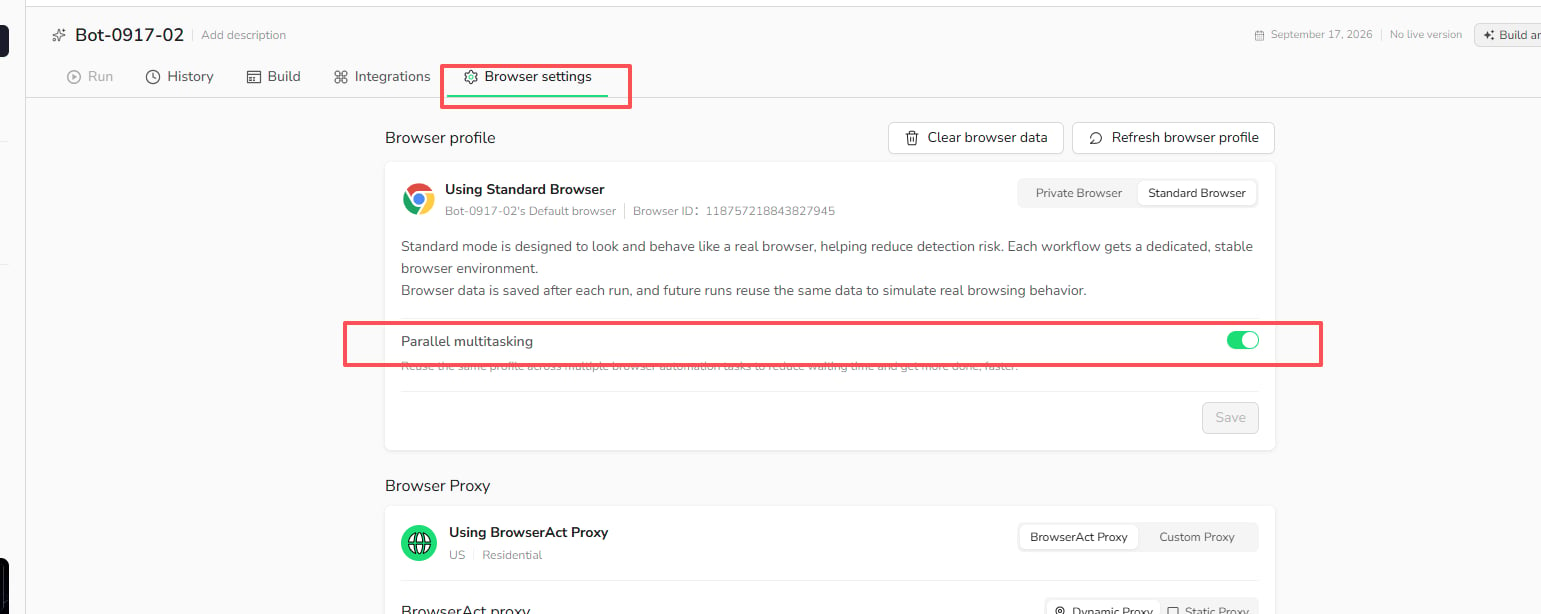
Parallel multitasking setting. This lets multiple tasks reuse the same saved Browser Profile while reducing wait time between runs.
How to Enable Parallel Tasks
- Open
Botsand select the Bot you want to configure. - Select
Browser settings. - Confirm that the Bot is using
Standard Browser. - Turn on
Parallel multitasking. - Select
Save.
What to Know
- Each task starts from the latest saved Browser Profile available when the task launches.
- Concurrent tasks reuse the same Browser Profile as their starting point.
- Concurrent runs do not overwrite the saved Browser Profile when they finish.
- Supported entry points include regular Bot runs, Workflow debugging, API, Make, n8n, and Zapier.
- The number of tasks that can run at the same time is still subject to your account’s concurrency limits.
Browser settings before running tasks in parallel.
When to Use This Setting
EnableParallel multitasking when you need to run multiple tasks from the same stable browser environment and can accept that the tasks share the Browser Profile available at launch.
Keep it turned off when tasks should run one at a time or when their browser state must not be shared as the starting point for other tasks.