


- Extracting all matching data from a full page at once (e.g., comment lists, article lists, product info).
- Extracting a set of fields from a detail page (e.g., multiple specification fields on a product detail page).
- Accumulating data from multiple pages when combined with Pagination inside a Loop.
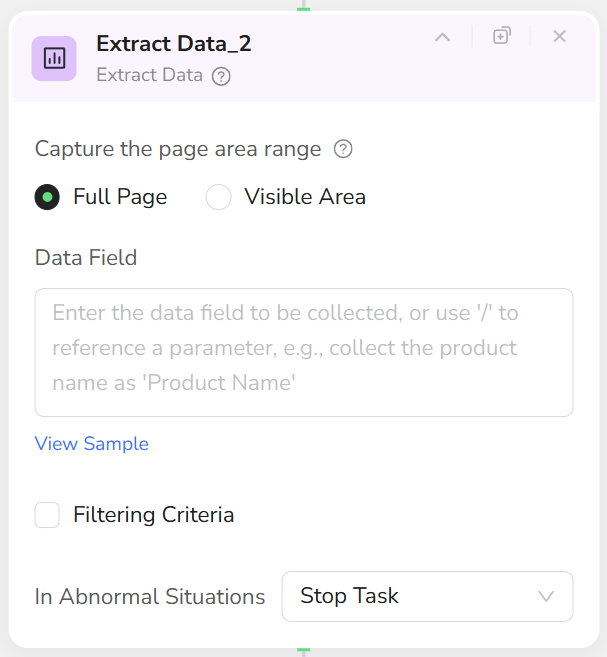
- Supports two extraction scopes: Full Page or Visible Area.
- Uses natural language to describe fields and positions to extract.
- Supports filtering conditions (filter by time, quantity, attributes, etc.).
- Can output formats like JSON, CSV, XML, Markdown (via Output Data node).
- Add an Extract Data node.
- Select extraction scope:
- Full Page: Collect data from the entire page.
- Visible Area: Collect data only from the current viewport.
- Clearly specify content to extract in the field description. For example:
- “Extract from product detail page: Product Name, Current Price, Original Price, Stock Status, Rating, Review Count, Seller Name, Shipping Info.”
- (Optional) Configure filtering criteria, for example:
- “Only keep reviews from the last 30 days.”
- “Only extract products with a price greater than 100.”
- For cross-page extraction, place Extract Data inside a Loop or combine with Pagination.
- For scenarios with complex page structures, consider using multiple Extract Data nodes to process different areas separately.
- Each Extract Data node executes extraction only once. For multi-page extraction, combine with Loop + Pagination.
- Consider adding a Wait node before extraction to ensure dynamic content has loaded.
- Field descriptions should be detailed, including field names and meanings, to facilitate subsequent use and maintenance.