> ## Documentation Index
> Fetch the complete documentation index at: https://docs.browseract.com/llms.txt
> Use this file to discover all available pages before exploring further.
# Input Text Node
> Automatically types text or variables into input fields, such as search bars or forms.
## Overview
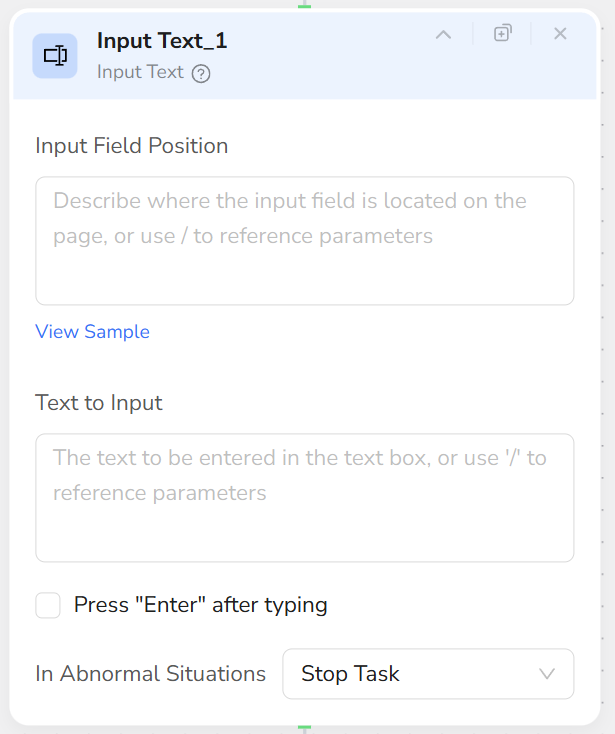
The **Input Text** node enters text into a web input field, such as a search box, form field, or message box.
 ## Use Cases
* Enter a keyword in a search box, then start the search with [**Click Element**](/bot/workflow-built/node-types/click-element-node).
* Fill in a form, login field, or contact field.
* Enter text in a comment box or message field.
* Use parameters to enter different values across runs or loop items.
## Core Capabilities
* Identify an input field from a natural-language description.
* Clear its existing value and enter the specified text.
* Reference an input parameter or a value from an earlier node.
## Configuration Steps
1. Add an **Input Text** node.
2. Configure **Input Box Description**, for example:
* "The search box at the top of the page"
* "The email address input field in the registration form"
* "The message input box in the bottom right corner of the page"
3. Configure **Text Content**:
* Directly enter fixed text (e.g., `customer service`).
* Enter `/` to reference parameters, such as `{{product_name}}` or `{{user_email}}`.
4. When the node runs, it will:
* Locate the described input box.
* Clear original content.
* Enter the specified text and proceed to the next step.
## Use Cases
* Enter a keyword in a search box, then start the search with [**Click Element**](/bot/workflow-built/node-types/click-element-node).
* Fill in a form, login field, or contact field.
* Enter text in a comment box or message field.
* Use parameters to enter different values across runs or loop items.
## Core Capabilities
* Identify an input field from a natural-language description.
* Clear its existing value and enter the specified text.
* Reference an input parameter or a value from an earlier node.
## Configuration Steps
1. Add an **Input Text** node.
2. Configure **Input Box Description**, for example:
* "The search box at the top of the page"
* "The email address input field in the registration form"
* "The message input box in the bottom right corner of the page"
3. Configure **Text Content**:
* Directly enter fixed text (e.g., `customer service`).
* Enter `/` to reference parameters, such as `{{product_name}}` or `{{user_email}}`.
4. When the node runs, it will:
* Locate the described input box.
* Clear original content.
* Enter the specified text and proceed to the next step.
 ## Recommendations
* Each Input Text node is responsible for one input field. Use multiple nodes for multiple fields.
* If the field is not visible, use **Scroll Page** or **Scroll to Element** first.
* Use parameter references for values that change between runs or loop items.
* If the page or form loads slowly, add [**Wait**](/bot/workflow-built/node-types/wait-node) before **Input Text**.
## Recommendations
* Each Input Text node is responsible for one input field. Use multiple nodes for multiple fields.
* If the field is not visible, use **Scroll Page** or **Scroll to Element** first.
* Use parameter references for values that change between runs or loop items.
* If the page or form loads slowly, add [**Wait**](/bot/workflow-built/node-types/wait-node) before **Input Text**.