> ## Documentation Index
> Fetch the complete documentation index at: https://docs.browseract.com/llms.txt
> Use this file to discover all available pages before exploring further.
# Click Element Item Node
> A specific child node for Loop List that clicks a link or button within the currently focused list item.
## Overview
**Click Element Item** is a child node used inside **Loop List**. It clicks a specific element within the current list item, such as a title link, product image, or **View Details** button.
 ## Use Cases
* Open each video from a video list and collect information from its detail page.
* Open each news headline and extract the full article content.
* Open each product title or image and collect specifications or reviews.
## Core Capabilities
* Identify a click target within the current list item using natural language.
* Open a detail page or expand content associated with the current item.
* Continue with [**Extract Data**](/bot/workflow-built/node-types/extract-data-node) or another action after the click.
## Configuration Steps
1. Add a [**Click Element Item**](/bot/workflow-built/node-types/click-element-item-node) node inside a [**Loop List**](/bot/workflow-built/node-types/loop-list-node).
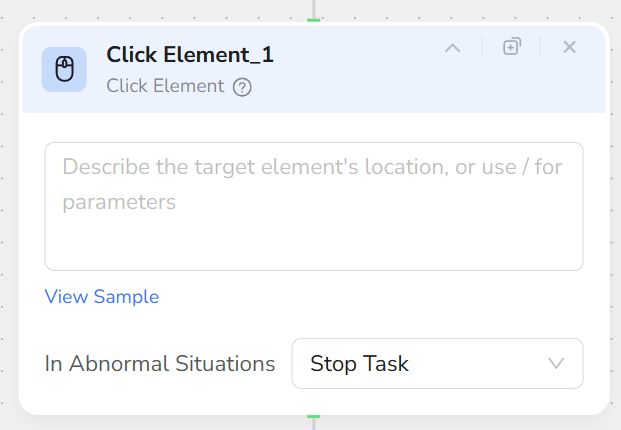
2. Describe the element to click in **Element Description**, for example:
* "Click the title link of the current job item"
* "Click the thumbnail of the current video item"
* "Click the View Details button in the current product item"
3. Add [**Extract Data**](/bot/workflow-built/node-types/extract-data-node) or another node after the click to continue processing the current item.
## Use Cases
* Open each video from a video list and collect information from its detail page.
* Open each news headline and extract the full article content.
* Open each product title or image and collect specifications or reviews.
## Core Capabilities
* Identify a click target within the current list item using natural language.
* Open a detail page or expand content associated with the current item.
* Continue with [**Extract Data**](/bot/workflow-built/node-types/extract-data-node) or another action after the click.
## Configuration Steps
1. Add a [**Click Element Item**](/bot/workflow-built/node-types/click-element-item-node) node inside a [**Loop List**](/bot/workflow-built/node-types/loop-list-node).
2. Describe the element to click in **Element Description**, for example:
* "Click the title link of the current job item"
* "Click the thumbnail of the current video item"
* "Click the View Details button in the current product item"
3. Add [**Extract Data**](/bot/workflow-built/node-types/extract-data-node) or another node after the click to continue processing the current item.
 ## Recommendations
* Use **Click Element Item** only inside **Loop List**.
* Each node performs one click. Add another node when the current item requires another click.
* Include "current item" and the visible label or element type in the description.
* When the list page must remain available, open or manage the detail page with the appropriate **Tab Operation** flow.
## Recommendations
* Use **Click Element Item** only inside **Loop List**.
* Each node performs one click. Add another node when the current item requires another click.
* Include "current item" and the visible label or element type in the description.
* When the list page must remain available, open or manage the detail page with the appropriate **Tab Operation** flow.